Keeping the notes, replacing the app.
Vault HQ · a front end for a second brain
My notes live in one folder of plain markdown: projects, references, daily notes, and a steady stream of things that agents write there on my behalf. The files work well. Obsidian, the app I opened them in, stopped being the right place to use them. So I kept the files and replaced the front end with Vault HQ, a small local app that reads the folder and shows what needs me. This is how the folder is organised, what HQ does on top of it, and the parts that took some care.
WHY NOT JUST OBSIDIAN
The folder had grown into structured data. Each daily note carries metric properties and an agent log, tasks are kept in sync with Taskwarrior, and repeated jobs keep findings files. Obsidian shows all of that as files to open. Three things kept getting in the way:
- Search found words, not meaning. If I didn't remember how I had phrased something, I didn't find it.
- The layout didn't show what needed attention. An overdue task, a proposal waiting on a yes or no, or an inbox capture going stale all looked like any other file.
- It was a place to look, not to act. Finishing a task, deciding something or sorting the inbox meant opening files and editing them by hand.
The markdown itself was never the problem, so nothing about the storage changed. HQ is a different window onto the same files. Obsidian can still open every note, and HQ has a key that does exactly that.
THE BRAIN UNDERNEATH
The vault is one folder with a fixed layout. Every top-level folder has a
purpose, and every folder carries its own AGENTS.md with the
rules for writing there.
THE LAYOUT
00-Inbox/        # raw captures and session summaries; sorted weekly
01-Projects/     # one living note per project
03-Learning/     # guides and how-tos
04-Personal/     # mine alone
05-References/   # runbooks, designs, findings for repeated jobs
06-Memory/       # shared agent memory: session logs and atomic facts
07-Agents/       # how each agent is wired to the vault
08-Archive/      # sorted and done
09-Planning/     # daily notes, weekly plans, the tasks inbox
_templates/      # one template per kind of note
_tools/          # the automation, installed from here
AGENTS.md        # the contract every writer reads first
Several writers share this folder: me, Claude Code, Cursor, and a handful
of scripts. That only works because they all follow one contract, the root
AGENTS.md. Its central idea is zones, which
decide whose words a note holds:
| ZONE | WHERE | AGENTS MAY |
|---|---|---|
| human | 04-Personal, 09-Planning, any note with author: human | read, link, move or copy. Never write or edit. A change is proposed as a proposal- note in the inbox instead. |
| shared | 01-Projects, 03-Learning, 05-References, 07-Agents | edit in place, keeping my wording and decisions intact |
| machine | 00-Inbox, 06-Memory, _tools | anything, within the naming and frontmatter rules |
The reason is plain. AI tends to smooth and summarise, and my own words
should stay exactly as I wrote them. The contract adds a few rules any
writer can follow: search for an existing note before creating one, copy
a template rather than invent a structure, name files in lowercase kebab
case, fill every frontmatter field including author, and
never write a secret into the vault, because it syncs to iCloud. A lint
script checks the result. After any meaningful action, an agent appends
one line to that day's note, under a heading that belongs to machines:
## Agent log
- 14:05 claude@mac · site · drafted the vault-hq post → [[vault-hq-design]]
AUTOMATION, INSTALLED FROM THE VAULT ITSELF
The scripts live in the vault's _tools/automation/, and one
installer wires them into the Mac. The vault the installer sits in is the
vault that Mac serves. The installed copy is the one that runs, so an
iCloud file that has been evicted can never break a hook. It sets up four
things:
- Claude Code hooks. When a session ends or its context is compacted, a digest of the session goes into
00-Inbox/, with a short summary written by a model, and a line goes into the day's agent log. Only prompts added since the last capture are written, so running it again never duplicates anything. - A two-way Taskwarrior sync. Checkboxes in notes are the tasks, and Taskwarrior is the fast way to work through them. Each synced checkbox carries an id (
🆔 a1b2c3) that matches a field on the Taskwarrior task. Conflicts are resolved three ways against the last synced snapshot. A field changed on one side wins. Changed on both sides, the vault wins. A Taskwarrior hook runs the sync after every change, so a task finished in the terminal is ticked in its note within seconds. - Daily metrics. A script writes numbers into the frontmatter of each daily note: vault and task counts, the lab's health (read from this site's public status feed), and photo-sorting progress on the NAS. The collectors are deterministic, with no model involved, so one note is one row of a time series and one property is one column.
- A launchd tick every 5 minutes runs the task sync, and runs the metrics when the last run is over 55 minutes old. macOS privacy controls refuse bare launchd jobs a listing of iCloud Drive, so the tick runs inside a small helper app that holds the needed permission, and everything it starts inherits it.
Because every writer uses the same folders, templates and log, knowledge
lands in one place whichever tool produced it. Two conventions make that
safe when writers overlap. Every script opens a vault file under the same
exclusive file lock (flock), so two writers never interleave
in one note. And tasks carry ids, so a task can be renamed, re-dated or
moved without the sync losing track of it.
HQ ON TOP
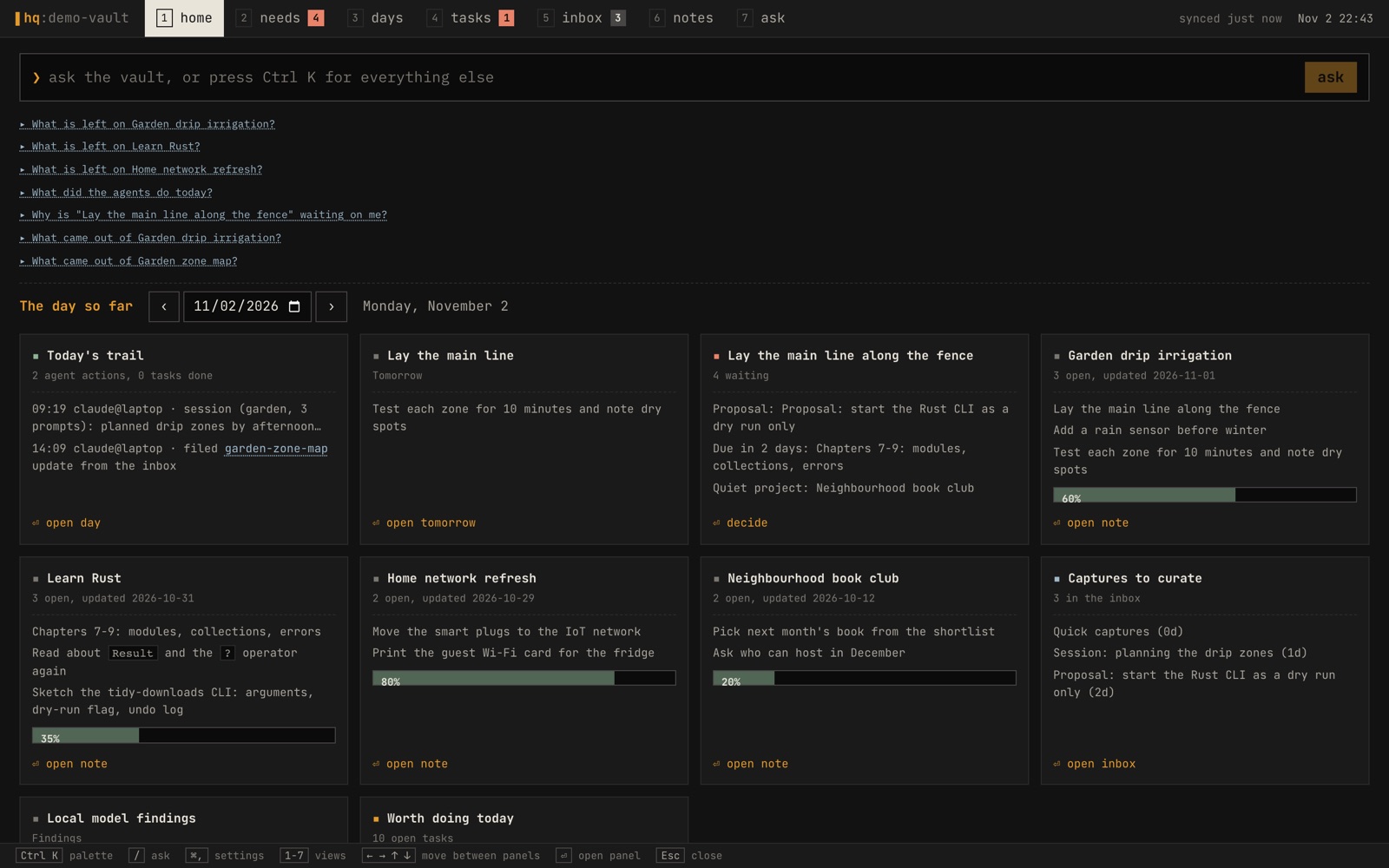
HQ is a local web app with a terminal look: tabs on number keys, a legend at the bottom showing the current view's keys, monospace throughout. The type follows the zones. My own words are set in IBM Plex Mono and machine output in JetBrains Mono, so a glance tells you who wrote a line.
- Home shows every panel at once: focus, what needs me, the inbox, the day's trail, tomorrow and projects, under an ask prompt, with a date picker for any day.
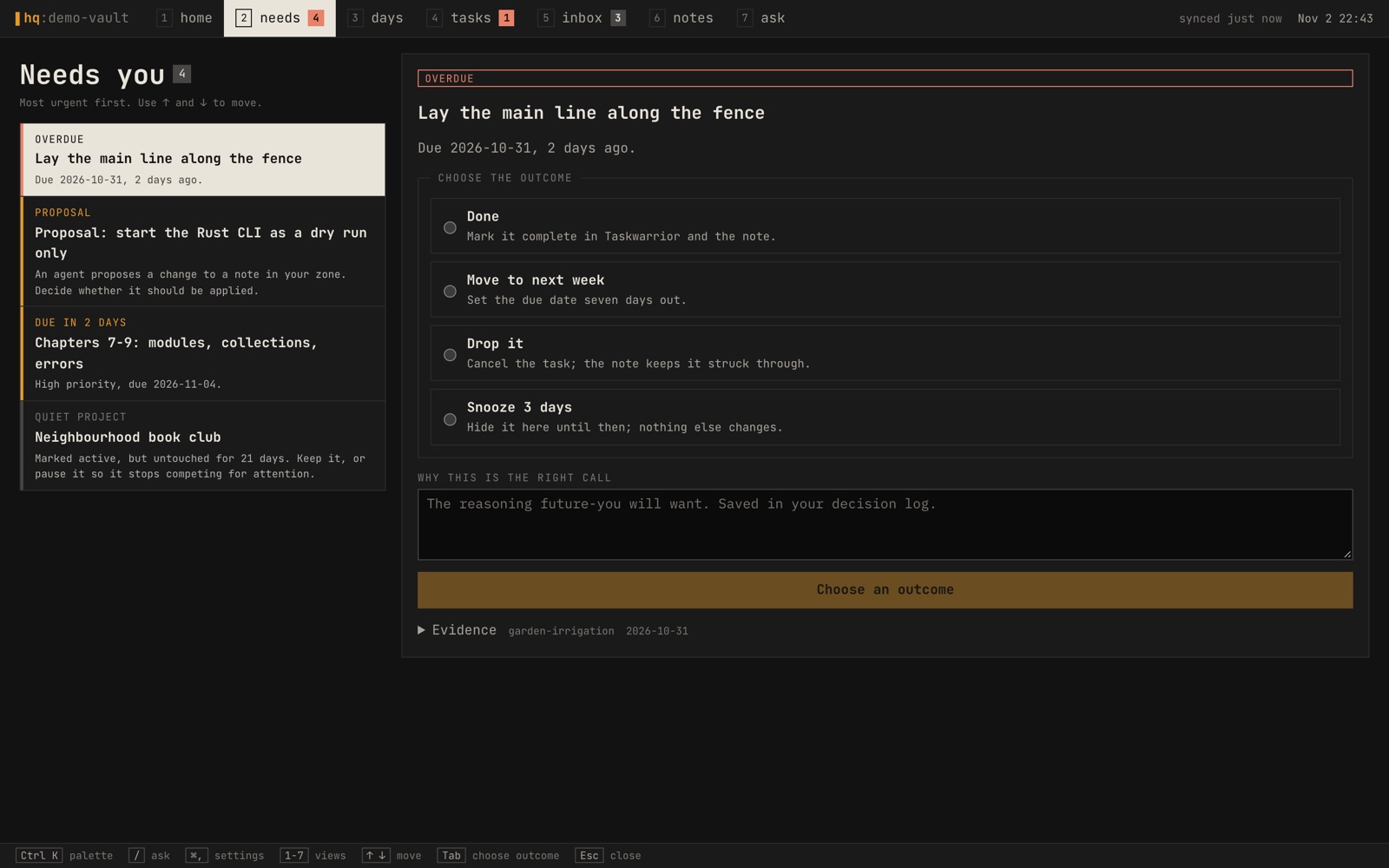
- Needs you is a queue of decisions. Each one is recorded with my reasoning.
- Days has day, 3-day and week views, with boxes for my own Quick Wins, Work, Learning and Tomorrow lines.
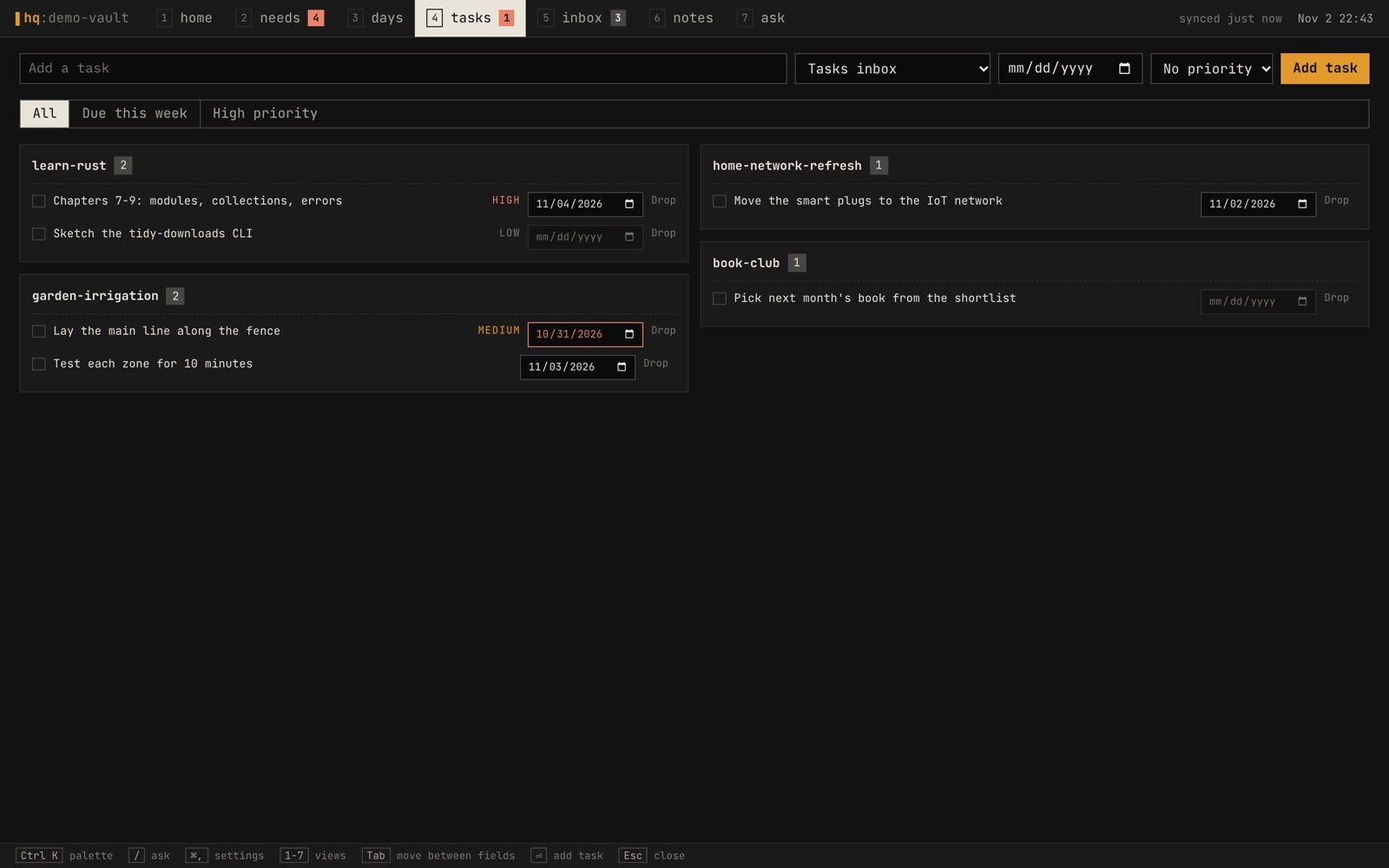
- Tasks and Inbox show Taskwarrior tasks and the captures waiting to be sorted.
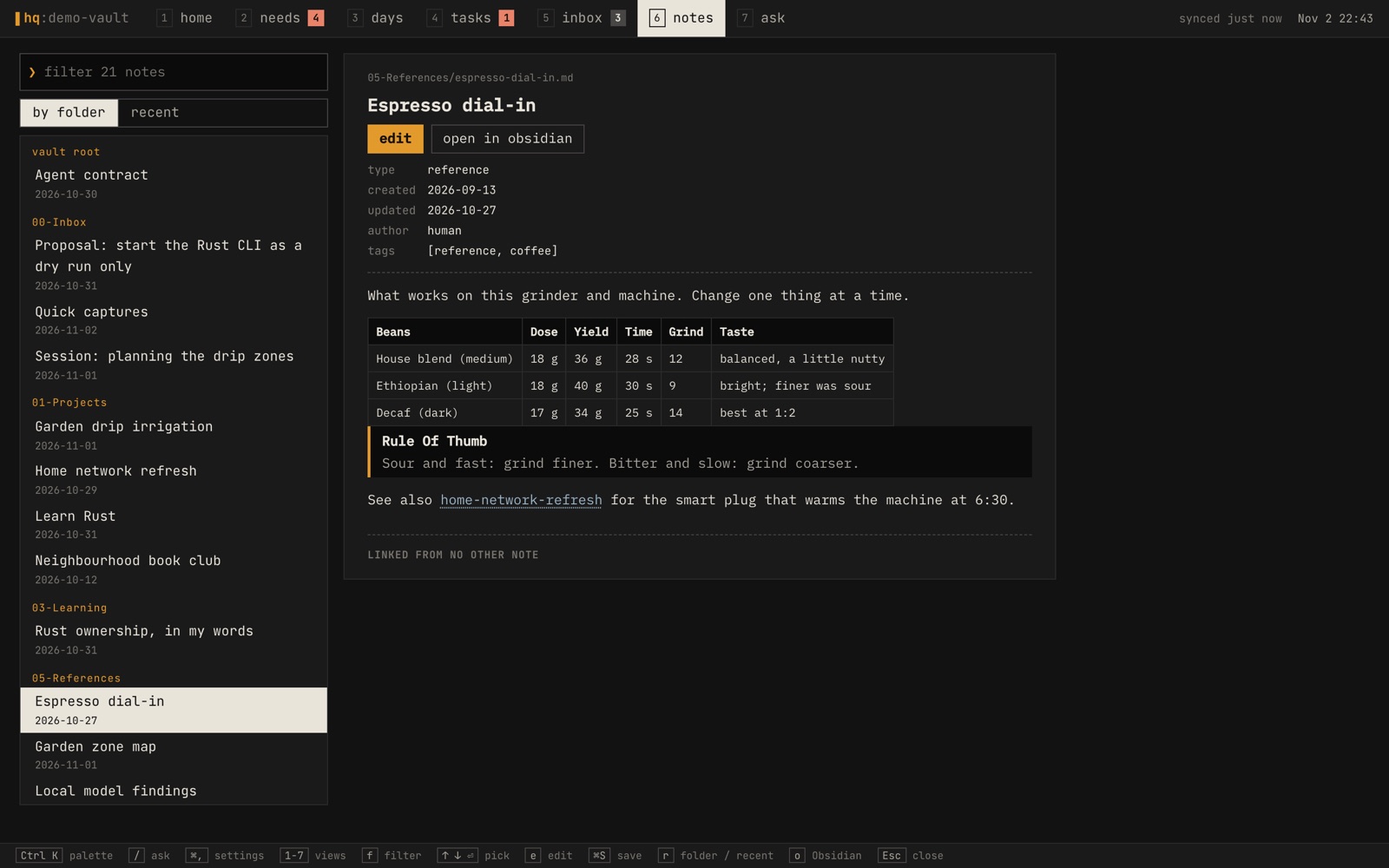
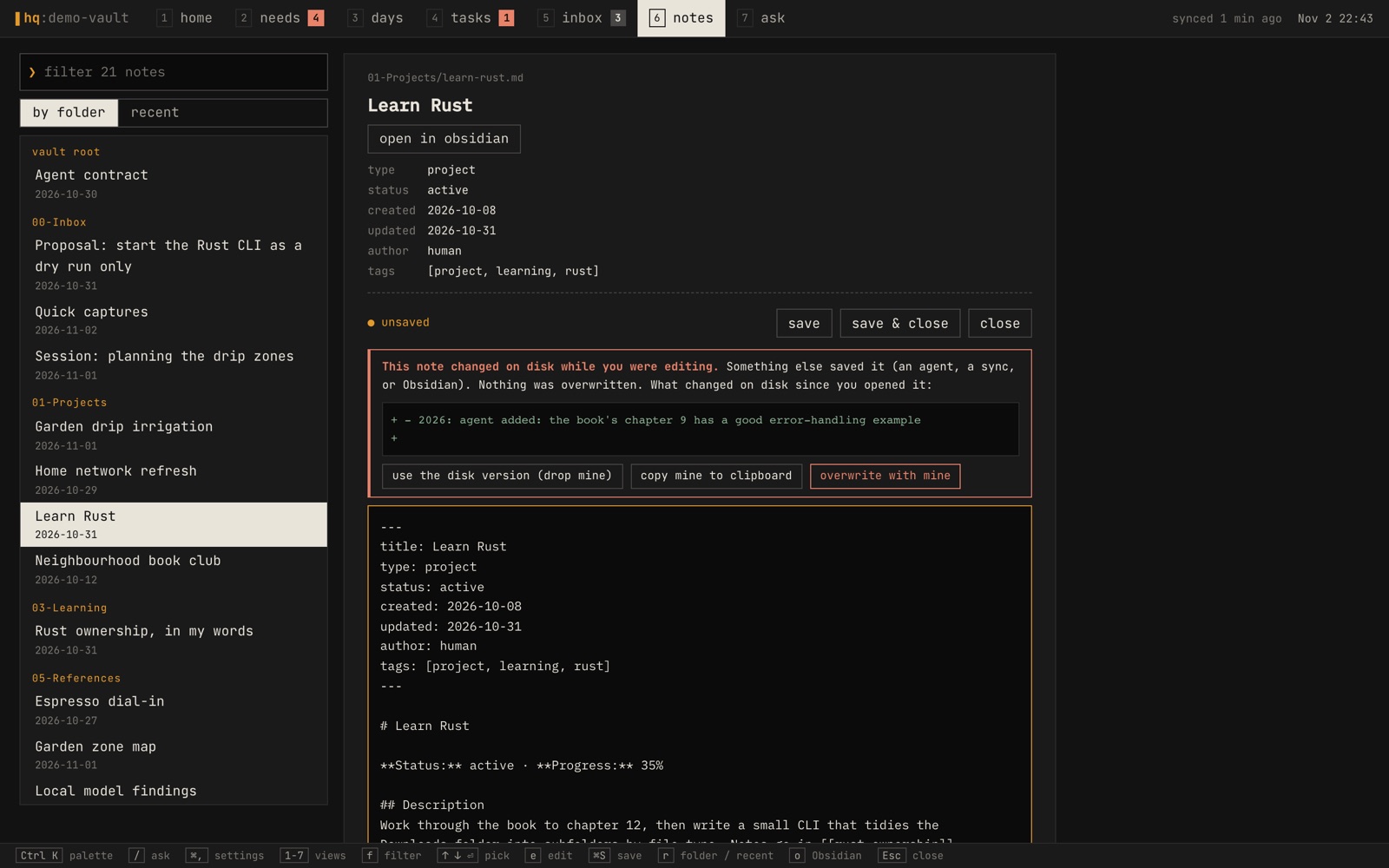
- Notes reads and edits any note, with tables, code and callouts rendered,
[[links]]followed in place, and the notes linking back listed under each one. - Ask searches and questions the notes, described next.
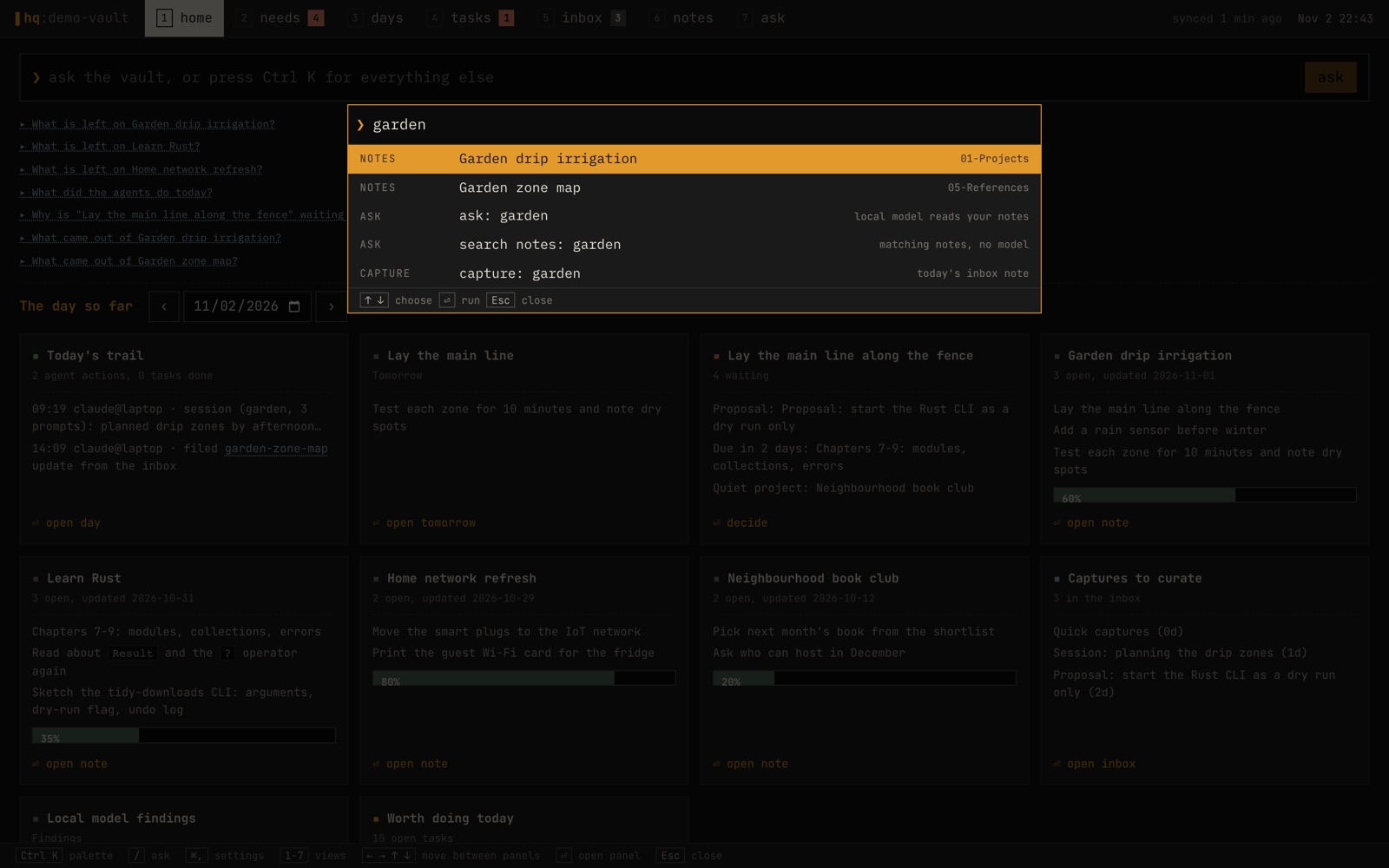
Ctrl K opens a palette to jump to any view, day or note, ask a question, or capture a thought into today's inbox note. ⌘, opens Settings.
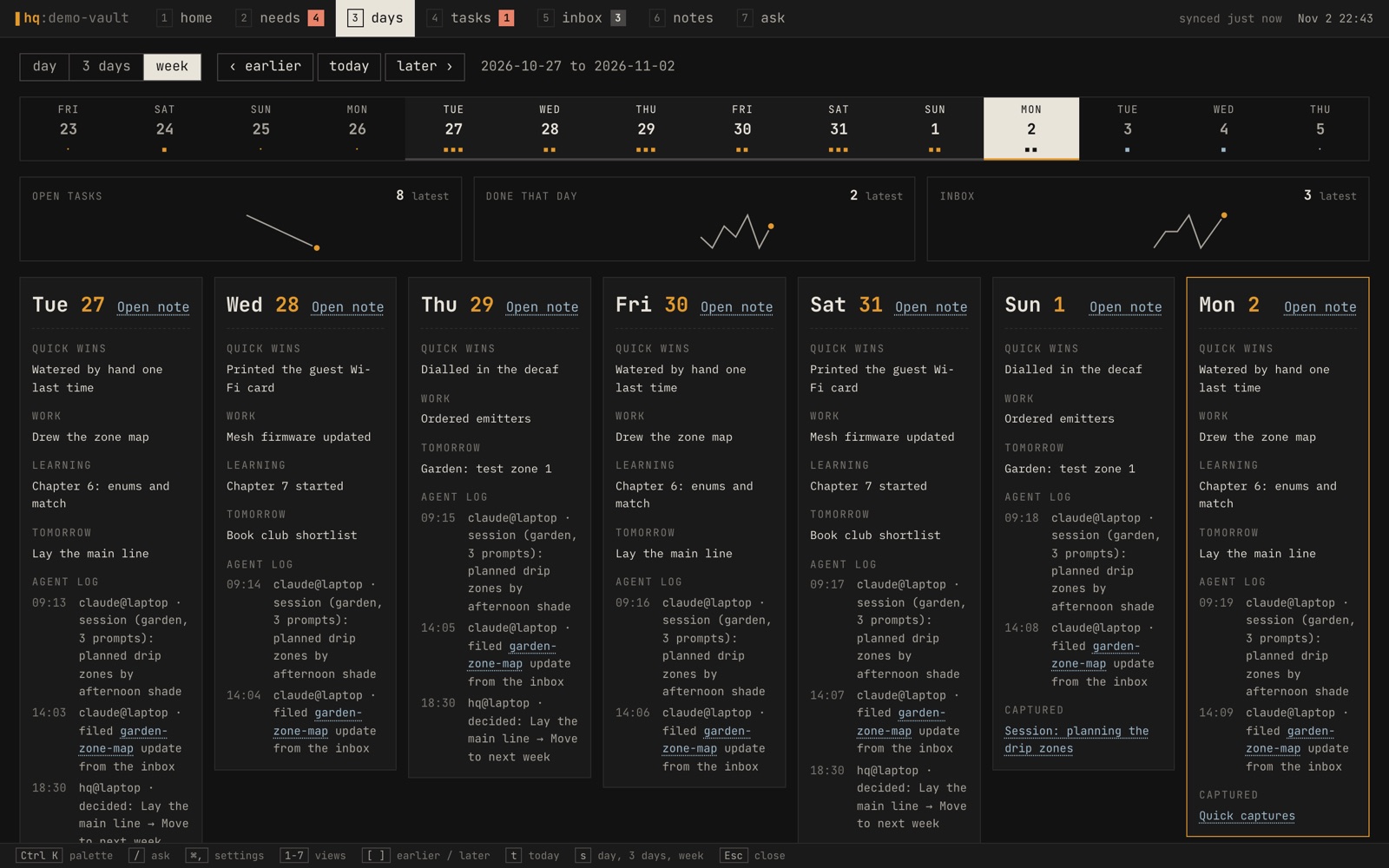
Needs you is the view I wanted most, and it has no model in it. What lands in the queue is decided by fixed rules in one file:
- an overdue task;
- a high-priority task due within 3 days;
- an agent's proposal to change a note in my zone;
- an inbox capture older than 2 days;
- an automation error in the last 24 hours;
- a project marked active but untouched for 14 days.
The order comes from the same rules (the later a task, the higher it sits), so it can be explained and does not shift between visits. Every answer, whether done, move to next week, drop, accept, decline or pause, is appended to a decision log in my zone with the outcome and a "why" in my own words. Snoozing is the one answer that skips the decision log.
Underneath, the server is Node 25 running TypeScript directly, with no
build step. It listens on localhost only and keeps no
database: the vault and Taskwarrior are the only stores. The two
exceptions are snoozes and the search index's embedding cache, kept
beside the automation's state. Every task change goes through the
task command, so Taskwarrior's own hook carries it back into
the note, and there is one write path for tasks. Every write request must
carry a custom header and come from the same origin, so no other website
open in the browser can drive it. Every vault write HQ makes lives in one
file, so the whole write surface can be read in one sitting.
LOCAL MODELS ONLY
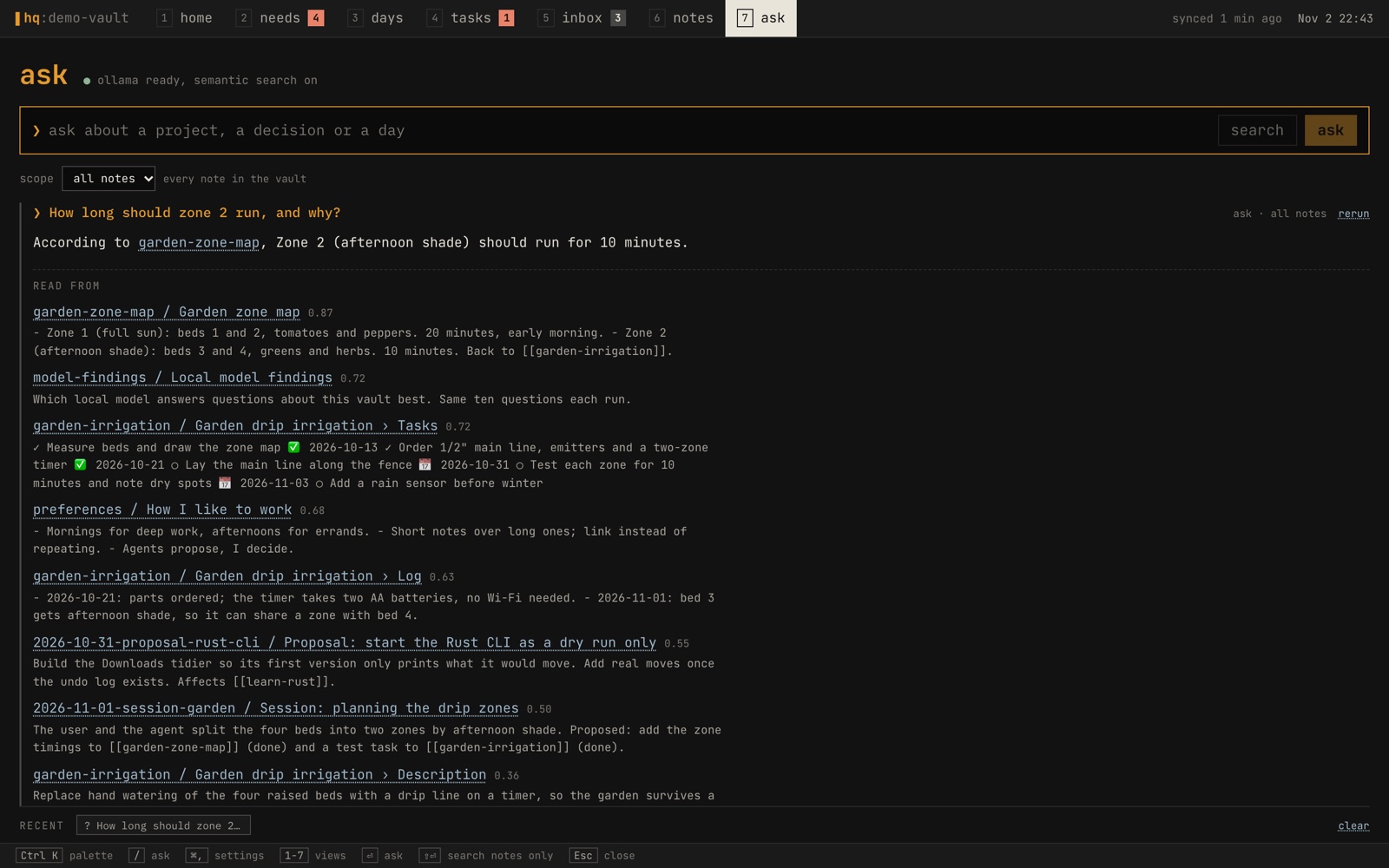
Ask is the meaning-based search Obsidian lacked, and it runs on Ollama on the Mac. Search works in three steps:
- Chunk. Every note is split into heading-sized chunks, and long sections are cut into overlapping pieces so each chunk stays a focused, embeddable size.
- Rank. Chunks are ranked by a blend of BM25, which matches exact words, and cosine similarity from
nomic-embed-textembeddings, which matches meaning. The weighting is 45% words and 55% meaning. Project notes count a little more and old session logs a little less, because living notes describe the present. No note may supply more than three chunks. - Answer. The top 8 chunks go to a local chat model,
llama3.1:8bby default, at a low temperature. It is told to answer only from the excerpts, to let the most recent date win when they disagree, and to cite every fact as a[[note]]link.
Small models sometimes write "Excerpt 3" despite being told to cite, so those references are rewritten into the matching note link before the answer is shown. The chunks the model read are listed under every answer, and Search notes skips the model and returns the ranked chunks alone. Embeddings are cached by a hash of each chunk, so only new or changed text is embedded again.
Settings lets me change the model server and the models, but it accepts
only an address on this Mac or the home network: plain
http://, a loopback or private-range address or a
.local name, and no path. Nothing in HQ talks to a cloud model,
so the notes never leave the house to be searched or answered. (The
wider setup does use a hosted model in one place: the short session
summary that the Claude Code hook writes, about a session that already
ran in Claude.)
ON THE MAC: THE TWO MODELS
ollama pull llama3.1:8b        # answers
ollama pull nomic-embed-text   # meaning, for search
THE PARTS THAT TOOK CARE
SAVING A NOTE WITHOUT CLOBBERING ANOTHER WRITER
The first design note said HQ would not be an editor; long writing would stay in Obsidian. That lasted five days. Once notes could be read in HQ, going elsewhere to fix a typo was the friction HQ existed to remove. But a note can change underneath an open editor at any moment: an agent appends a line, the task sync ticks a box, iCloud brings in an edit from another device.
So the editor starts from the file's exact text and its SHA-256. A save sends both back. Under the same file lock every other vault writer uses, the server reads the file again, and refuses the save if the hash no longer matches. HQ then shows what changed and lets me choose. Unsaved text is kept as a draft per note in the meantime.
THE SAVE, SIMPLIFIED (THE REAL ONE ALSO BUMPS updated:)
with open(path, "r+") as f:
    fcntl.flock(f, fcntl.LOCK_EX)          # the lock every vault writer takes
    cur = f.read()
    if sha256(cur) != base:                # changed since the editor read it
        return conflict(cur)               # show it; never overwrite blind
    f.seek(0); f.truncate(); f.write(new)  # in place, not by rename
The last line goes against the usual advice. The safe way to replace a file is normally to write a new one and rename it over the old. Here that would be wrong. The lock belongs to the open file, not its name. A writer that already holds the lock on the old file would keep writing into a file that no longer has a name, and its change would be lost. So the save truncates and writes the same file, under the same lock. Saves can also only reach notes the vault scan already found. The path is never built from the request, so an edit can't escape the folder.
WHEN macOS REFUSED TO READ THE NOTES
HQ started in a terminal, and then moved into a LaunchAgent so it would
always be running. Under launchd it is a background process, and macOS
refused it reads of iCloud files that were not stored locally. The read
failed with Unknown system error -11 (EDEADLK),
and one failed read blanked every view.
The fix was a Finder setting: right-click the vault folder and choose Keep Downloaded, which keeps every note inside stored on the Mac. The lasting change was in the code. The scan now skips a note it can't read, and the top bar says "N notes unreadable", with the list on hover. One bad file can no longer take the whole page down with it. The automation's settings file is now read from the installer's local copy, so the lab and NAS cards don't depend on iCloud being reachable.
A 4.6 MB NATIVE APP AROUND THE SAME PAGE
A browser tab is easy to lose, so HQ also has a native Mac app, built
with Tauri. It is a Rust shell around the same interface, which it loads
from the local server. On disk it is 4.6 MB (du -sh on the
installed app, with a release build that is size-optimised, link-time
optimised and stripped). It adds what a tab can't do:
- a menu-bar icon, and closing the window only hides it;
- a global hotkey, ⌃⌥Space, that brings HQ forward with the palette open, and puts it away again if it is already in front;
- open at login, on by default the first time;
- starting the HQ service if it isn't answering.
The page gets no native access at all. Tauri can expose native functions to the page through its IPC bridge, and HQ grants none. Any link that isn't the local server is handed to macOS, so the web opens in the browser and a note link opens in Obsidian. The window can only ever show HQ.
PERSONAL CODE IN ONE FILE
My work notes live on a separate machine, in a separate vault, and never mix with these. That machine runs its own copy of HQ, and each copy reads exactly one vault, the one its installer recorded. The few features that only make sense at home, such as the lab and NAS cards, live in a single file that HQ loads only if it exists. Each one also stays off unless the vault's own settings list it. The export script copies HQ without that file, without git history, and without builds, and it fails if a personal term is still in the copy. It is the only supported way to move HQ to another machine. Settings can also refuse to open a vault before reading anything inside it.
BY THE NUMBERS
Everything here comes from the repository or a command run against it on 2026-11-02.
| WHAT | VALUE | HOW IT WAS COUNTED |
|---|---|---|
| first commit | 2026-10-28 | git log |
| commits | 9, the last on 2026-11-02 | git log |
| server | 2,097 lines of TypeScript | wc -l, the personal file left out |
| interface | 4,807 lines of TypeScript, TSX and CSS | wc -l |
| native shell | 237 lines of Rust | wc -l |
| native app on disk | 4.6 MB | du -sh on the installed app |
| runtime dependencies | 3: React, React DOM, Zod | package.json |
| chunks sent to the model | 8 | the search code |
The design note's first check, on 2026-10-28, recorded a task added in HQ and then dropped, which reached Taskwarrior and the note in about 5 seconds, and a cited answer from the vault in about 50 seconds on the default 8B model.
LIMITS, AND WHAT IS NEXT
- The phone is still Obsidian. HQ is Mac only, by decision. On the phone I read and write the same files in Obsidian.
- An 8B model sometimes prefers an older fact. The prompt tells it the newest date wins, and it doesn't always listen. The sources under each answer are the thing to trust.
- iCloud evictions are slow to recover from. The first load after iCloud evicts the notes takes about two minutes while they download again, unless the folder is kept downloaded.
- The first question after a change embeds the new chunks. That takes about a minute for the whole vault and seconds after that.
More is coming. HQ shows one place today, but the same pattern can take in other streams: a bookmark importer, for one, and a quick-capture bar where I type something to remember and it lands as a clean note in the right folder, following the same contract every other writer does.
The whole thing started from the idea of building a second brain: one place that people and tools both write to, and that gives back what matters when it matters. Vault HQ is my version of the part you look at.
ASK AN AGENT
PROMPT: AN AGENT CONTRACT FOR MY NOTES FOLDER
My notes are a folder of markdown files that I and several AI agents write to. Read the folder's structure (not the content of personal notes) and draft an AGENTS.md contract for it.

- Propose zones: folders and notes that are mine alone, ones agents may edit in place, and ones that belong to machines. Agents must never edit my zone; they propose changes as a new note in the inbox instead.
- Naming and frontmatter rules (title, type, created, updated, author, tags), and a template per kind of note.
- One log line per meaningful action in that day's note, in a fixed format.
- How writers avoid clobbering each other: one shared file lock, and a refusal to save over a file that changed since it was read.
Show me the draft and a list of folders you were unsure about. Write nothing until I agree.